



 Yeni Kayıt











 Konudaki Resimler


|
Belki konusu vardır bilmiyorum ancak MGS4 RPCS3 de tam güncellenmediği için oyunu oynamak için belli ayarlara ve çökme yaşamamak için bir yamaya ihtiyacınız var. Bende bir konu açıp belki oyunu oynamak isteyen ancak bu hatalardan dolayı oynayamayan kişilere yardımcı olması için detaylı anlatıp paylaşacağım. MGS4'ü PC'de oynamak için ilk önce oyunun .iso'sunu google aracılığıyla bulup indirmeniz lazım. Yasak olabilir link vermiyorum özel mesaj ile sorabilirsiniz. İşlemler: 1.Oynanış için Ayarlar Dosyası: Oyunu indirip RPCS3'e attıktan sonra sorunsuz oynayabilmeniz için aşağıdaki kodu metin belgesine yapıştırıp daha sonra kaydederken tüm dosyalar seçip "mgs4config.yml" olarak kaydedip, RPCS3 ana klasörüne atabilirsiniz. Daha sonra oyunu açmadan önce oyuna sağ tıklayıp "boot with manually selected configuartion" diyoruz ve kaydettiğimiz "mgs4config.yml" dosyasını seçiyoruz. EN SON tüm işlemler bitince oyunu "Boot with custom configuration" yazısına tıklayarak açacağız. 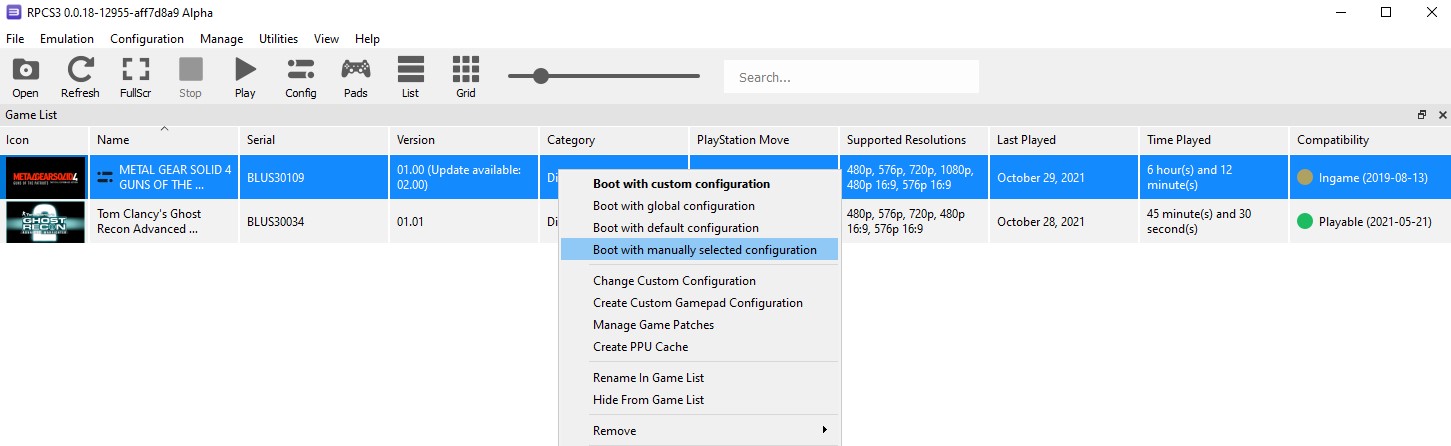 Config dosyası için kod: Core: PPU Decoder: Recompiler (LLVM) PPU Threads: 2 PPU Debug: false Save LLVM logs: false Use LLVM CPU: "" Max LLVM Compile Threads: 0 Enable thread scheduler: true Set DAZ and FTZ: false SPU Decoder: Recompiler (LLVM) Lower SPU thread priority: false SPU GETLLAR polling detection: false SPU Debug: false Preferred SPU Threads: 0 SPU delay penalty: 3 SPU loop detection: true Max SPURS Threads: 3 SPU Block Size: Safe Accurate GETLLAR: false Accurate SPU DMA: false Accurate Cache Line Stores: false Accurate RSX reservation access: false SPU Verification: true SPU Cache: true SPU Profiler: false Enable TSX: Disabled Accurate xfloat: false Approximate xfloat: true LLVM Accurate DFMA: true PPU LLVM Java Mode Handling: false Accurate PPU 128-byte Reservation Op Max Length: 0 PPU LLVM Accurate Vector NaN values: false Stub PPU Traps: 32 Debug Console Mode: false Hook static functions: false Libraries Control: [] HLE lwmutex: false SPU LLVM Lower Bound: 0 SPU LLVM Upper Bound: 18446744073709551615 TSX Transaction First Limit: 800 TSX Transaction Second Limit: 2000 Clocks scale: 100 Sleep Timers Accuracy: Usleep Only Performance Report Threshold: 500 Enable Performance Report: false SPURS Urgent queue size: 2 FCGT accuracy: Approximate FCMGT accuracy: Default FM accuracy: Approximate FNMS accuracy: Approximate FMA accuracy: Default FMS accuracy: Default FREST accuracy: Default FRSQEST accuracy: Default FI accuracy: Default FA accuracy: Default FS accuracy: Default FESD accuracy: Default FRDS accuracy: Default FCEQ accuracy: Default FCMEQ accuracy: Default CFLTS accuracy: Default CFLTU accuracy: Default CSFLT accuracy: Default CUFLT accuracy: Default Lib Loader: Load automatic and manual selection Load libraries: [] Accurate PUTLLUC: false Approx FCGT: true Accurate FM: false Approx FM: false Approx FMA: false Approx FS: false MGS4 Stuff: false Sleep timers accuracy: Host Accurate PUTLLC: false SPU Wake-Up Delay: 0 SPU Wake-Up Delay Thread Mask: 63 VFS: $(EmulatorDir): "" /dev_hdd0/: $(EmulatorDir)dev_hdd0/ /dev_hdd1/: $(EmulatorDir)dev_hdd1/ /dev_flash/: $(EmulatorDir)dev_flash/ /dev_usb000/: $(EmulatorDir)dev_usb000/ /dev_bdvd/: "" /app_home/: "" Enable /host_root/: false Initialize Directories: true Limit disk cache size: false Disk cache maximum size (MB): 5120 /dev_flash2/: $(EmulatorDir)dev_flash2/ Video: Renderer: Vulkan Resolution: 1280x720 Aspect ratio: 16:9 Frame limit: 60 MSAA: Auto Shader Mode: Async Shader Recompiler Write Color Buffers: false Write Depth Buffer: false Read Color Buffers: false Read Depth Buffer: false Log shader programs: false VSync: false Debug output: false Debug overlay: false Use Legacy OpenGL Buffers: false Use GPU texture scaling: false Stretch To Display Area: false Force High Precision Z buffer: false Strict Rendering Mode: false Disable ZCull Occlusion Queries: false Disable Vertex Cache: false Disable FIFO Reordering: false Enable Frame Skip: false Force CPU Blit: false Disable On-Disk Shader Cache: false Disable Vulkan Memory Allocator: false Use full RGB output range: true Strict Texture Flushing: false Disable native float16 support: false Multithreaded RSX: true Relaxed ZCULL Sync: false Enable 3D: false Debug Program Analyser: false Consecutive Frames To Draw: 1 Consecutive Frames To Skip: 1 Resolution Scale: 250 Anisotropic Filter Override: 0 Texture LOD Bias Addend: 0 Minimum Scalable Dimension: 16 Shader Compiler Threads: 0 Driver Recovery Timeout: 1000000 Driver Wake-Up Delay: 200 Vblank Rate: 240 DECR memory layout: false Vulkan: Adapter: GeForce RTX 2080 Force FIFO present mode: false Force primitive restart flag: false Performance Overlay: Enabled: false Enable Framerate Graph: false Enable Frametime Graph: false Detail level: Minimal Metrics update interval (ms): 350 Font size (px): 10 Position: Top Right Font: n023055ms.ttf Horizontal Margin (px): 50 Vertical Margin (px): 50 Center Horizontally: false Center Vertically: false Opacity (%): 70 Body Color (hex): "#FFE138FF" Body Background (hex): "#002339FF" Title Color (hex): "#F26C24FF" Title Background (hex): "#00000000" Shader Compilation Hint: Position X (px): 20 Position Y (px): 690 Shader Loading Dialog: Allow custom background: false Darkening effect strength: 30 Blur effect strength: 0 Reprotect Hack: false Vulkan Event Hack: false ZCull query default value: 1 Disable Asynchronous Shader Compiler: false No Reprotect: false VK Event hack: false GoW3 hack: false Gondemned hack: false D3D12: Adapter: "" Audio: Renderer: XAudio2 Dump to file: false Convert to 16 bit: false Audio Channels: Downmix to Stereo Start Threshold: 1 Master Volume: 100 Enable Buffering: true Desired Audio Buffer Duration: 50 Sampling Period Multiplier: 100 Enable Time Stretching: false Time Stretching Threshold: 75 Microphone Type: "Null" Microphone Devices: "@@@@@@@@@@@@" Downmix to Stereo: true Input/Output: Keyboard: "Null" Mouse: Basic Camera: "Null" Camera type: Unknown Move: "Null" Pad: Keyboard System: License Area: SCEA Language: English (US) Keyboard Type: English keyboard (US standard) Enter button assignment: Enter with cross Console time offset (s): 0 Net: Internet enabled: Disconnected IP address: 0.0.0.0 DNS address: 8.8.8.8 IP swap list: "" PSN status: Disconnected NPID: "" Connection status: Disconnected Miscellaneous: Automatically start games after boot: true Exit RPCS3 when process finishes: false Start games in fullscreen mode: false Prevent display sleep while running games: true Show trophy popups: true Show shader compilation hint: false Use native user interface: true GDB Server: 127.0.0.1:2345 Silence All Logs: false Window Title Format: "%R | %V | %T [%t]" Show FPS counter in window title: true Port: 2345 Log: {} 2.Çökme için yama: Oyunun Çökmesini engellemek için aşağıdaki kodu tekrar aynı şekilde boş bir metin belgesine yazıp, farklı kaydederken aşağıdaki tüm dosyalar ı seçip "imported_patch.yml" olarak kaydediyorsunuz. Bu kaydettiğiniz dosyayı ise RPCS3 emülatörünün klasöründeki "patches" klasörünün içine atıyorsunuz. Daha sonra RPCS3'ü açıp üst menüden Manage>Game Patches e tıklıyorsunuz ve açılan pencerede listede Metal Gear Solid 4: Guns of the Patriots oyununu göreceksiniz. Daha sonra indirdiğiniz .iso nun sürümü neyse ona tıklayıp açıyorsunuz ve "cellSpurs urgent commands hack" yazan kutucuğu işaretliyorsunuz. Apply ve Save diyerek kapatıyorsunuz. 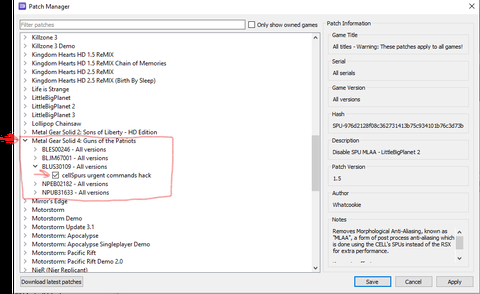 Patch kodu: Version 1.2 PRX-rbYkgZMgx8Prd7WUAA39oYAdWcNo-0: "cellSpurs urgent commands hack": Games: "Metal Gear Solid 4: Guns of the Patriots": BLES00246: [ All ] BLUS30109: [ All ] BLJM67001: [ All ] NPUB31633: [ All ] NPEB02182: [ All ] Author: elad335 Notes: "Workaround for freezes in Metal Gear Solid 4.\nThis patch applies to a firmware file for all games!\nUsage outside of Metal Gear Solid 4 is for debug purposes only.\nYou must have firmware version of exactly 4.87 in order to use it.\n\nKnown to affect:\nMetal Gear Solid 4" Patch Version: 1.0 Patch: - [ be32, 0x182B8, 0x38000002 ] Önemli!: Oyunu ve RPCS3'ü SSD'ye kurmanız çok önemli, HDD'de oynarsanız oyunu baştan sona bitirirken sürekli oyununuz durur ve "compiling shaders" yazısını görürsünüz. SSD'de ise bu sorunu yaşamazsınız. Oyunu bir kere bitirdikten sonra da HDD olsa bu durum tekrar etmez. HDD'ye kurulan oyunların bir çözümü yoktur, shader yüklemesi ve sıklığı oyundan oyuna değişir. < Bu mesaj bu kişi tarafından değiştirildi SOLID SNAKE -- 29 Ekim 2021; 13:46:1 > |
|
_____________________________
PSN: Ghosty-tr - Steam: Ghostliving
MSI RTX 5070 - Intel i5 13400F - 32 GB DDR4 RAM - MSI MAG 750W Bronze PSU - MSI Pro B760M-P PlayStation 5 Digital Edition |
 dikiştutmazsabri
 kullanıcısına yanıt

 kullanıcısına yanıt
 kullanıcısına yanıt